
What Happens When You Connect to the Internet?
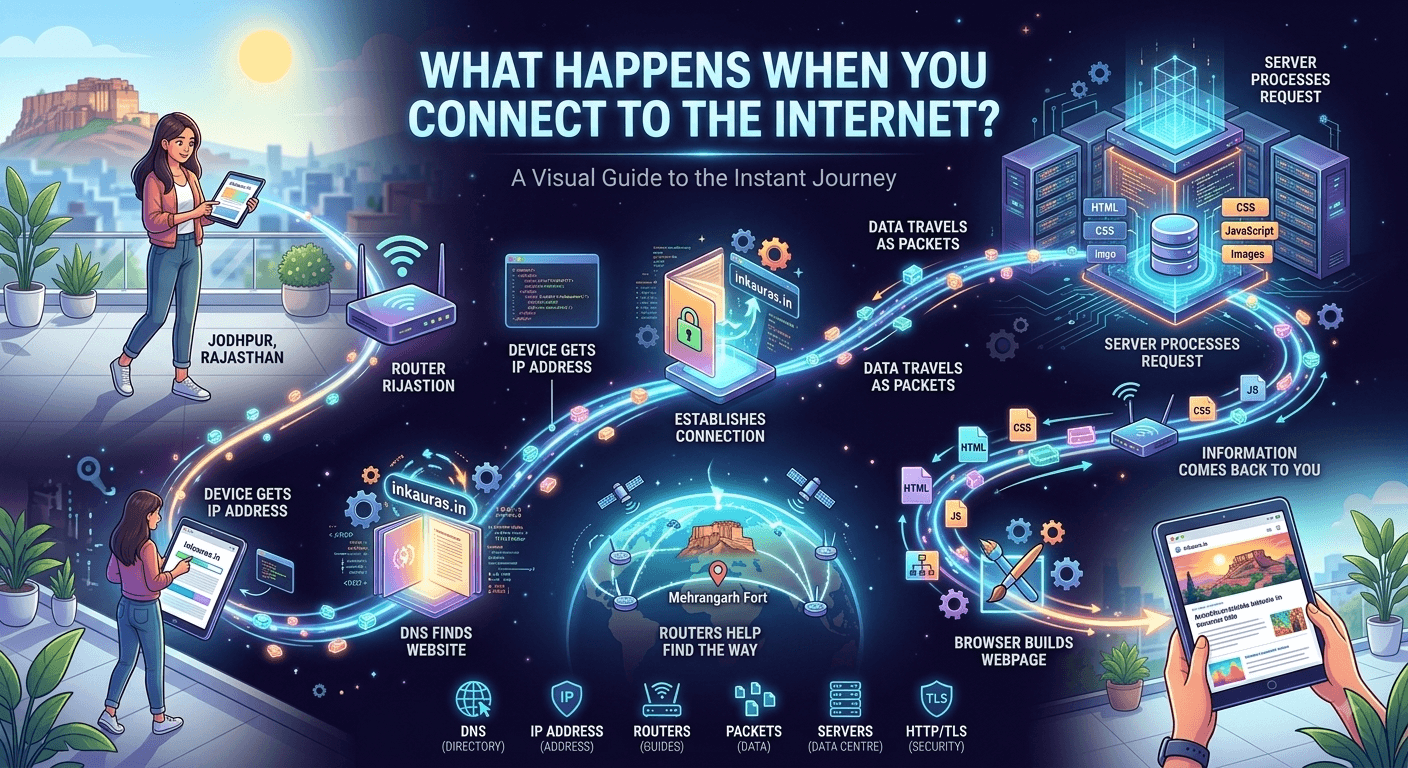
Connecting to the internet feels instantaneous, but opening a simple webpage actually triggers a complex behind-the-scenes journey. This quick process relies on your device, network providers, DNS servers, and security protocols seamlessly working together in just a few seconds.
Deepak Singhal
Introduction
We connect to the internet dozens of times a day, often without thinking about what is actually happening.
You open your laptop, connect to Wi-Fi and type a website address. Within a few seconds, a webpage appears.
It feels almost instantaneous.
But behind those few seconds is a surprisingly complex process involving your device, Wi-Fi or mobile network, your Internet Service Provider (ISP), DNS servers, routers, web servers, security protocols and several other technologies.
So what actually happens when you connect to the internet?
Let's understand it in simple language—without getting buried in technical jargon.
First, What Exactly Is the Internet?
The internet isn't one giant computer sitting somewhere in the world.
It is better understood as a global network of interconnected networks.
Your home network, your mobile network, your ISP's network, cloud infrastructure, university networks, business networks and many other networks can communicate with each other using common standards.
The Internet Society describes the internet as a global “network of networks” made up of tens of thousands of interconnected networks operated by service providers, companies, universities, governments and others.
This is important because the internet and the World Wide Web are not exactly the same thing.
The internet provides the underlying infrastructure.
The web is one of the services that operates on that infrastructure. Email, online gaming, video calls and many other applications also use internet connectivity.
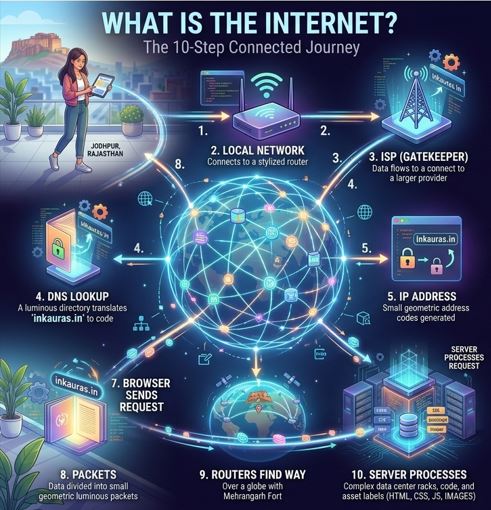
Step 1: Your Device Connects to a Network
Everything starts with your device.
It could be:
- Smartphone
- Laptop
- Desktop computer
- Smart TV
- Tablet
- Gaming console
- Smart device
If you're using Wi-Fi, your device communicates with a wireless router.
If you're using mobile data, your smartphone communicates with a nearby cellular network.
The router or mobile network then provides a path toward your ISP or another network that can connect your device to the wider internet.
At this point, your device has access to a network—but that doesn't mean it has directly connected to every website or service on the internet.
There is still a lot happening behind the scenes.
Step 2: Your Device Gets an IP Address
Computers need addresses to communicate with one another.
This is where an IP address comes in.
An IP address identifies a device or network interface so that internet traffic can be delivered to the appropriate destination.
You can think of it somewhat like a postal address.
If you want to send a physical package, you need an address.
Similarly, internet communication needs addressing information so that data can travel between devices.
Modern networks use both IPv4 and IPv6 addressing.
You generally don't need to know your IP address to browse the internet because your operating system, router and network provider handle much of this process automatically.
Step 3: You Type a Website Address
Now imagine that you open your browser and type:
inkauras.in
Your browser needs to figure out where that website is located.
The problem is that humans prefer names, while computers communicate using numerical network addresses.
This is where DNS comes in.
Step 4: DNS Finds the Website
DNS stands for Domain Name System.
You can think of DNS as a kind of directory for internet services.
Instead of requiring you to remember a numerical IP address, DNS allows you to use a human-friendly domain name such as:
inkauras.in
The DNS system helps determine the IP address associated with that domain.
Your device typically sends a DNS query through a DNS resolver. If the required information isn't already available in its cache, the resolver may communicate with other DNS servers to find the appropriate answer.
Once the browser has the relevant IP address, it knows where it needs to send the next request.
Importantly, DNS doesn't mean there is one single computer containing every website address. It is a distributed system designed to translate human-readable domain names into information that internet applications can use.
Step 5: Your Browser Establishes a Connection
Now your browser needs to communicate with the destination server.
For a modern HTTPS website, several networking and security processes can be involved before the actual webpage request is exchanged.
At a simplified level, the connection involves internet protocols that help devices communicate reliably.
For secure websites, TLS (Transport Layer Security) is also used.
TLS helps authenticate the server and encrypt communication between the browser and server. MDN explains that the TLS negotiation establishes a secure connection before the browser sends the actual content request.
This is one reason you see:
https://
rather than simply:
http://
when visiting many modern websites.
Step 6: Your Browser Sends a Request
Once the connection is ready, your browser can ask the server for a resource.
For example, when you visit a webpage, the browser may send an HTTP request asking for the page.
You can think of it like this:
Browser:
“Hello, I would like this webpage.”
Server:
“Here is the information you requested.”
HTTP, or Hypertext Transfer Protocol, defines how web clients and servers communicate.
A common HTTP request method is GET, which is used to request a resource.
MDN describes HTTP as the application-level protocol through which clients and servers communicate when retrieving web resources.
Step 7: The Data Travels as Packets
Here's another important part.
The webpage isn't necessarily sent as one enormous piece of data.
Information travelling across the internet is divided into smaller units commonly called packets.
A packet contains information that helps the network deliver it, along with part of the actual data being transmitted.
Different packets can travel through different network paths depending on circumstances.
When they reach the destination, the receiving system can use the information associated with them to put the data back together.
MDN explains that packets can arrive out of sequence and that networking protocols provide mechanisms to handle this process.
This approach makes large-scale network communication practical and resilient.
Step 8: Routers Help Find the Way
How does your data travel from your device to a server that might be thousands of kilometers away?
Through a series of network connections and routing decisions.
Routers help determine where packets should go next.
You can imagine the process as a journey with many intersections.
Your packet starts from your device, passes through your local network and ISP, and may cross several other networks before reaching its destination.
The exact path isn't necessarily fixed.
The internet is designed as a distributed system, with many interconnected networks rather than one centrally controlled network.
Step 9: The Server Processes Your Request
Eventually, your request reaches the appropriate server or service infrastructure.
But a modern website isn't necessarily just one computer sitting in a data centre.
A website may use multiple servers, databases, content delivery systems, security services and other infrastructure.
The server receives your request and determines what information needs to be returned.
For a simple webpage, that could include HTML.
But modern websites may also require:
- CSS files
- JavaScript
- Images
- Fonts
- Videos
- Data from databases
- Other external resources
MDN explains that webpages commonly consist of HTML, CSS, JavaScript and additional assets such as images, video and documents.
Step 10: The Information Comes Back to You
The server sends a response back through the network.
Again, the information travels through the internet infrastructure as data packets.
Your device receives the information, and your browser begins processing it.
If the server successfully handled the request, the response could include an HTTP status such as:
200 OK
This basically means that the request was successfully handled.
Other status codes can indicate redirects, missing resources, permission problems or server errors.
MDN documents common HTTP response codes including 200, 301, 403, 404 and 500.
Step 11: Your Browser Builds the Webpage
Now comes the part you actually see.
Your browser takes the received resources and processes them.
It interprets HTML to understand the structure of the page.
CSS helps determine how elements should look.
JavaScript can add interaction and dynamic behavior.
Images, fonts and other resources are also loaded as required.
The browser then renders the information into the webpage you see on your screen.
All of this can happen within seconds—or sometimes much faster.
Why Does a Website Sometimes Load Slowly?
If all these steps can happen so quickly, why do websites sometimes take several seconds to load?
There can be many reasons.
For example:
- Slow internet connection
- Network congestion
- High server load
- Large images or videos
- Too many webpage resources
- Slow DNS response
- High network latency
- Problems somewhere along the connection path
MDN notes that latency and bandwidth are important factors in web performance and that pages can require multiple network requests for different resources.
So when a webpage takes longer than expected, the problem isn't necessarily your computer.
There are many components between your device and the service you're trying to access.
What About Security?
Connecting to the internet also means communicating across networks you don't directly control.
This makes security important.
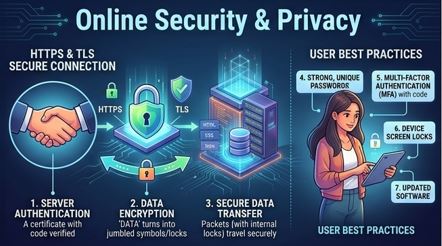
When visiting websites, look for HTTPS and keep your browser and operating system updated.
For important accounts, consider using:
- Strong, unique passwords
- Multi-factor authentication
- Device screen locks
- Trusted networks
- Updated software
- Caution with unexpected links and downloads
HTTPS and TLS can protect the contents of a connection from being read or modified by someone intercepting the communication, but no single technology makes all online activity completely risk-free.
It's also worth remembering that privacy and security are not exactly the same thing.
For example, DNS has historically had privacy limitations because DNS queries can reveal information about the domains a device is looking up. The Internet Society discusses these privacy considerations and technologies designed to improve DNS privacy.
The Entire Process in Simple Words
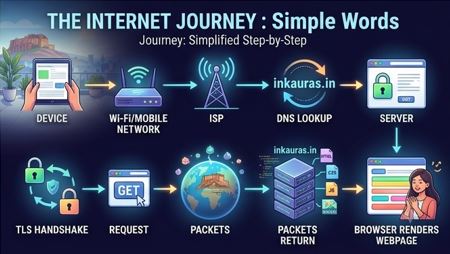
The next time you type a website address, remember this simplified journey:
Your Device → Wi-Fi/Mobile Network → ISP → DNS Lookup → Destination Server → Request → Packets → Server Response → Your Browser → Webpage
It may look like a long process.
But modern internet infrastructure is designed to perform these operations extremely quickly.
That's the remarkable part.
A few taps on a screen can trigger communication across a global network of interconnected systems—and the result appears on your device almost immediately.
Inkauras Insight
The next time someone says “I'm going online,” remember that there isn't really a single place called “the internet.”
You're connecting your device to a network that can communicate with countless other networks around the world.
Behind a simple webpage are:
DNS → IP addresses → Routers → Packets → Servers → HTTP → TLS → Browser
You don't need to become a networking expert to use the internet.
But understanding these basics can make everyday technology feel a little less mysterious.
Final Thoughts
The internet often feels invisible because it works quietly in the background.
You tap a link.
A page appears.
You send a message.
It reaches someone else.
You upload a photograph.
A friend thousands of kilometers away can see it.
Behind these simple actions is a combination of open standards, interconnected networks, servers, routing systems and software working together.
The next time a webpage loads almost instantly, take a moment to appreciate what just happened.
Your device communicated with a global network—and brought the result back to your screen in seconds.
Technology Disclaimer
This article is intended for general informational and educational purposes only. It provides a simplified explanation of internet technologies and is not professional advice relating to networking, cybersecurity, telecommunications or information technology.
Internet architecture and technologies are complex, and the exact sequence of events can vary depending on the device, network, browser, website, protocols and infrastructure involved. Readers requiring technical or security guidance should consult appropriate documentation or a qualified professional.Rate this article
Sign in to rate this article.